Year - End Offer Is Live — Get limited-time discounts on MCAD + EV Courses. Avail Offer
Tata I Get It - Student Professional Enterprise
i get it search
TATA - Student Professional Enterprise

i GET IT by Tata Technologies
  • About us New
    • About i GET IT
    • Our Programs
      • EngAge Professional Program
      • EngAge Student Program
      • Campus Program
      • Author Program
      • Reseller Program
  • i GET IT For Enterprise
  • Plans and Pricing New
    • All in One Bundles Best Buy
      • Electric Vehicle Certifications        
        • EV – High Voltage, Thermal & Battery Certification Program
        • EV – Advanced Battery Certification Program
      • MCAD Professional Bundle
      • MCAD+EV Professional Bundle
    • EV Subscriptions
      • EV – Essentials
      • EV – Energy Storage System Fundamentals
      • EV – Thermal Management System
      • EV – Battery Pack Design
      • EV – BMS (Battery Management System)
      • EV – High Voltage Systems
    • MCAD Subscriptions
      • Dassault Systems
        • 3D Experience Subscription
        • CATIA V5 Subscription
        • SOLIDWORKS Subscription
      • Siemens Digital Industries
        • Siemens NX PLM Subscription
      • GD&T Subscription
      • Plastics and Molding Subscription
      • ISO GPS Subscription
      • PTC CREO & Wildfire Subscription
      • Autodesk Subscription
  • Insights
    • Business Blogs
    • Tech Blogs
    • Webinars
  • Course Catalog
  • searchigetit search
  • Contact Us
  • Sign In / Sign Up
Sign In / Sign Up Sign In / Sign Up

SOLIDWORKS vs AutoCAD – Which is Better? [Detailed Comparison]
March 26, 2024 2024-11-16 0:12

SOLIDWORKS vs AutoCAD – Which is Better? [Detailed Comparison]

SOLIDWORKS vs AutoCAD_blog banner
General SOLIDWORKS Tech
Manjunath
March 26, 2024
7,672 views
0 comments

SOLIDWORKS vs AutoCAD – Which is Better? [Detailed Comparison]
Welcome to the world of Computer-Aided Design (CAD), where precision engineering meets boundless creativity. In this dynamic realm, there is always the talk of comparison of two prominent players: SOLIDWORKS Vs AutoCAD.  AutoCAD® is renowned for its 2D drafting capabilities, ideal for civil construction plans and floor layouts. Meanwhile, SOLIDWORKS® excels in intricate 3D modeling for engineering designs and machinery assemblies. While both are CAD software, their features and applications vary significantly. As we embark on an in-depth comparison of SOLIDWORKS and AutoCAD, we’ll compare their strengths, weaknesses, user interface and ideal applications to assist you in making an informed decision for your design endeavours. 


Table of Contents

SOLIDWORKS Vs AutoCAD: Introduction


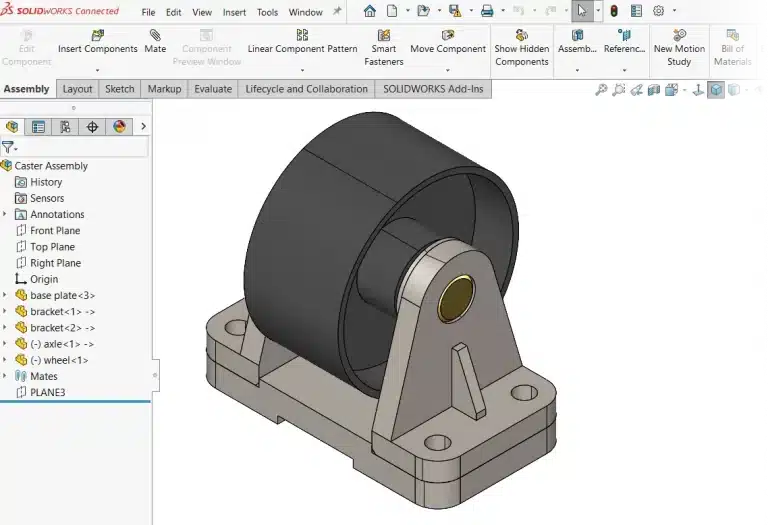
SOLIDWORKS, crafted by Dassault Systemes, emerges as a powerhouse in solid modelling CAD software, particularly favoured by mechanical engineers and product designers. Its forte lies in parametric modelling and assembly design, empowering users to craft intricate 3D models effortlessly. With a robust set of tools including extrude, revolve, loft, and sweep, SOLIDWORKS facilitates precise design iterations and modifications, bringing ideas to life with unparalleled precision and efficiency. Its intuitive user interface caters specifically to mechanical designers, ensuring ease of navigation and rapid adaptation to its rich feature set.

SOLIDWORKS vs AutoCAD - Solidworks diagram
autocad vs solidworks_3D visualization of autocad gif
Visual Representation of 3D Model designed in SOLIDWORKS

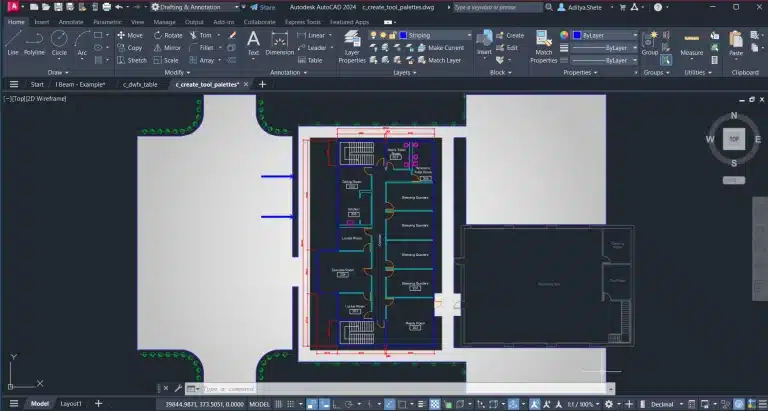
In the vast landscape of CAD software, AutoCAD, birthed by Autodesk, reigns supreme as a versatile tool catering to a myriad of industries including architecture, engineering, and construction. While renowned for its 2D drafting capabilities, AutoCAD also offers a suite of 3D modelling tools, albeit not as advanced as SOLIDWORKS. This comprehensive solution enables designers to create intricate architectural plans, engineering drawings, and basic 3D models, positioning AutoCAD as a staple in design and documentation tasks across diverse sectors.

Autocad vs solidworks_UI

SOLIDWORKS Vs AutoCAD – Differences

Lets find the differences in AutoCAD and SOLIDWORKS software. We will do the comparison of SOLIDWORKS Vs AutoCAD on the basis of their modelling capabilities,  user interface,  file compatibility, compatibility and industry applications.

1. Comparing Modelling Capabilities

SOLIDWORKS shines with its robust solid modelling capabilities, enabling users to sculpt complex 3D models with precision and ease. By leveraging parametric modelling, design modifications become seamless, empowering users to adjust parameters and witness real-time changes rippling across the entire model. On the other hand, while AutoCAD offers both 2D drafting and rudimentary 3D modelling tools, its strength lies in its 2D capabilities. While adequate for simple 3D models, AutoCAD may not match the sophistication of SOLIDWORKS in intricate 3D design tasks.

2. Exploring User Interface

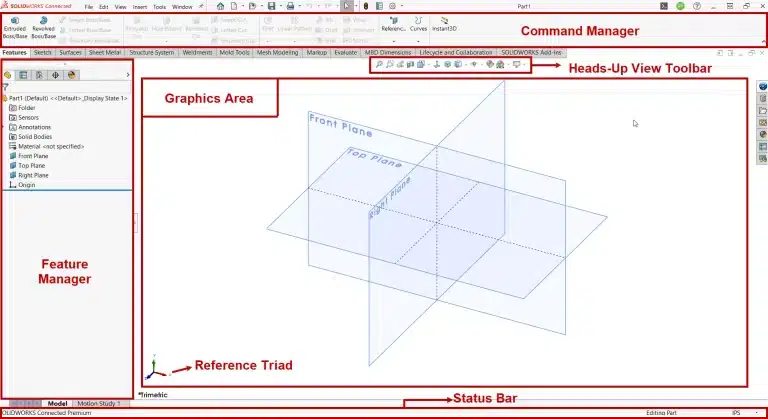
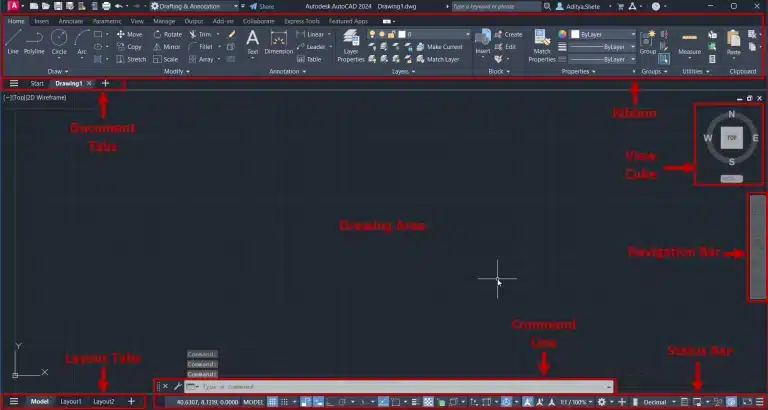
SOLIDWORKS vs AutoCAD UI_Solidworks UI representation
solidworks versus cad features

The user interface serves as the gateway to CAD software proficiency, influencing user experience and productivity. SOLIDWORKS boasts a user-friendly interface meticulously tailored for mechanical designers, offering intuitive tools and workflows. This design-centric approach ensures rapid adoption and seamless integration into the design process. Conversely, AutoCAD presents a more complex interface, especially for beginners, owing to its vast array of tools and functionalities. However, once acclimated, AutoCAD provides unparalleled flexibility and customization options, catering to diverse user preferences and workflows.

3. Unravelling File Compatibility

File compatibility plays a pivotal role in fostering seamless collaboration and interoperability across CAD platforms. SOLIDWORKS employs proprietary file formats (.sldprt for parts and .sldasm for assemblies), ensuring data integrity but potentially posing compatibility challenges with other CAD software. Nonetheless, SOLIDWORKS supports import/export functionality for various file formats, mitigating interoperability concerns to a certain extent. In contrast, AutoCAD supports a plethora of file formats including DWG, DXF, and DWF, facilitating effortless collaboration and file sharing across different platforms and software suites.

4. Navigating Collaboration and Compatibility

Efficient collaboration lies at the heart of successful design projects, and CAD software plays a pivotal role in facilitating seamless teamwork. SOLIDWORKS offers robust collaboration tools such as eDrawings and integrates seamlessly with SOLIDWORKS PDM for streamlined data management. This cohesive ecosystem enhances collaboration and workflow efficiency, empowering teams to collaborate seamlessly on design projects. Similarly, AutoCAD provides collaboration tools like Autodesk Drive and Autodesk Viewer, along with seamless integration with other Autodesk products, facilitating a smooth workflow across projects and teams.

5. Analysing Industry Applications

This aspect is very important in AutoCAD Vs SOLIDWORKS comparison. Both SOLIDWORKS and AutoCAD find extensive application across diverse industries, each catering to specific design needs and workflows. SOLIDWORKS thrives in industries such as automotive, aerospace, and consumer goods, where complex mechanical components and assemblies demand precision and efficiency in design. Moreover, SOLIDWORKS’s prowess extends to prototyping and manufacturing, making it a cornerstone in the product development lifecycle. Conversely, AutoCAD finds its niche in architecture, engineering, and construction, where detailed 2D drawings and basic 3D models are paramount. Its versatility extends to urban planning and interior design, further solidifying its position as a go-to CAD solution in various sectors.

6. Benefits of SOLIDWORKS and AutoCAD

SOLIDWORKS:

  • Robust solid modelling capabilities for intricate 3D designs.
  • Intuitive user interface tailored for mechanical designers.
  • Seamless integration with SOLIDWORKS PDM for efficient data management. 

AutoCAD:

  • Versatile application across multiple industries, including architecture and construction.
  • Extensive file format support for seamless collaboration.
  • Affordable pricing options, including student licenses.

7. SOLIDWORKS Vs AutoCAD: Pricing Comparison

Pricing considerations play a significant role in the selection of CAD software, especially for budget-conscious users and organizations. SOLIDWORKS commands a premium, offering various licensing options including perpetual licenses and subscription-based plans tailored to diverse budgetary requirements. While AutoCAD also falls under the premium category, it offers more affordable pricing options including subscription-based plans and discounted student licenses, making it accessible to a broader audience. The pricing of AutoCAD is mentioned $2,030/year for 1 user on its official website whereas for SOLIDWORKS, pricing information is unavailable unless you submit an inquiry on their official website upon which a reseller will contact you.

SOLIDWORKS Vs AutoCAD: Comparison Summary

SOLIDWORKS versus AutoCAD Comparison

SOLIDWORKS Vs AutoCAD: Which is better for you?

In the dynamic landscape of CAD software, SOLIDWORKS and AutoCAD emerge as frontrunners, each offering unique strengths and applications. SOLIDWORKS excels in mechanical design and assembly modelling, providing unparalleled precision and efficiency in 3D modelling tasks. Conversely, AutoCAD’s versatility makes it a staple in architecture, engineering, and construction industries, catering to diverse design needs and workflows. The choice between SOLIDWORKS and AutoCAD hinges on specific requirements, industry preferences, and budget considerations. By understanding the nuances and capabilities of each software, users can make informed decisions, unlocking their creative potential and enhancing productivity in design endeavours.

SOLIDWORKS is ideal for mechanical engineers and designers requiring precise 3D modeling and assembly capabilities. On the other hand, AutoCAD is well-suited for architects, engineers, and construction professionals needing versatile 2D drafting tools for diverse design tasks. Ultimately, the choice between SOLIDWORKS and AutoCAD depends on individual requirements, industry preferences, and budget constraints, enabling users to optimize their design workflows and maximize productivity.

For those seeking to master both SOLIDWORKS and AutoCAD, i GET IT offers comprehensive CAD training courses, including SOLIDWORKS certification and AutoCAD certification programs. These courses provide in-depth instruction and hands-on experience, equipping learners with the skills and expertise needed to excel in their chosen CAD software

About i GET IT

i GET IT by Tata Technologies is an eLearning solution platform, tailored to enhance engineers’ proficiency in utilizing today’s premier MCAD (Mechanical Computer Aided Design) applications and refining design skills. We offer over 2000+ courses for mechanical engineers ranging from EV, AutoCAD, SOLIDWORKS, GD&T, PLM and many more

For additional tech insights, explore our tech blogs. Sign up now and receive a complimentary subscription to our informative newsletter.

Embark on your journey to upskill today!

Should you have any inquiries, feel free to contact us at iproducts@tatatechnologies.com or igetitsupport@tatatechnologies.com for assistance.

autocad, CAD, design engineering, solidworks, tech
Share this post
Manjunath
Meet Manjunath Goshanatti, a versatile professional excelling in CAD expertise, data science, and technical content writing. With a keen eye for detail and a knack for simplifying complex concepts, Manjunath delivers authentic content on mCAD software solutions.
Cam and Follower Mechanism – Types, Working & Application
Engineering CAD Drawing Views: Learn Basics, Types & Examples

Related Posts

What is Product Lifecycle Management? PLM explained

What is PLM? – Product Lifecycle Management [Detailed Guide]

October 9, 2025
225 views
Lead-Acid vs. Lithium-Ion Batteries_banner image

Lead-Acid vs. Lithium-Ion Batteries: Key Differences & Best Uses

June 13, 2025
535 views
Top AutoCAD 3D Commands & Shortcuts-banner image

Top AutoCAD 3D Commands & Shortcuts with Examples

April 9, 2025
2,222 views
what is engineering mechanics - blog banner image

What is Engineering Mechanics? – Introduction 101

March 10, 2025
1,490 views
inventor blog banner image

How to Create Stitch Weld in Weldments using Autodesk Inventor?

November 15, 2024
616 views

Find

Categories

  • 3DEXPERIENCE (4)
  • Aerospace Engineering (1)
  • AutoCAD (1)
  • AUTODESK INVENTOR (4)
  • Business (16)
  • CATIA V5 (5)
  • EV (3)
  • GD&T (1)
  • General (1)
  • General (10)
  • PLM (1)
  • PTC CREO (5)
  • Siemens NX (7)
  • SOLIDWORKS (8)
  • Tech (46)

Latest Posts

What is Product Lifecycle Management? PLM explained
PLM
What is PLM? – Product Lifecycle Management [Detailed Guide]
October 9, 2025
SOLIDWORKS certification roadmap image 2025 — from CSWA to CSWE, showing training path, skills level, and i GET IT platform recommendation
Business
SOLIDWORKS Certification: Top Courses, Prep Tips & Salaries
July 29, 2025
Top Online Automotive Design Engineer Courses
Business
Top Automotive Design Engineer Courses by Tata Technologies
July 15, 2025

Popular Tags

3DEXPERIENCE ACES Aerospace Aircraft Cabin Assembly autocad autodesk Autodesk Inventor Business CAD CAD courses CAD Drawings CAD Drawing view CAM cam and follower Career cars CATIA V5 catiav5 Chamfer corner relief CREO design engineering Design Engineers dimensioning Engineering Education ev EV Engineer GD&T inventor Mechanical engineering NX NX 2306 Online Certification product design PTC Sketcher Sketching Solid Combine solidworks Spinal Bend tech tech tips threaded stud work Upskilling
App Download
Facebook Twitter Youtube Linkedin

Course Topics

EV Design
NX
CATIA V5
3DEXPERIENCE CATIA
SOLIDWORKS
PTC Creo
Autodesk Training
Plastic Part
GD&T
ISO GPS
And more ...
EV Design
CATIA V5
SOLIDWORKS
Autodesk Training
GD&T
NX
3DEXPERIENCE CATIA
PTC Creo
AutoCAD
ISO GPS
Plastic Part
And more ...

About

About Us
Contact Us
Blogs

Programs

Campus Program
Author Program
Reseller Program

Support

Help
Privacy Policy
Terms of Use
Cookie Policy

close-window chat
cosmos

Cosmos

AI powered chatbot

close-cosmos
Need help? Talk to Us

Hey! I am here to Help You!

Have you already filled the form?

This helps us guide you faster.

User Details

Please enter your details so we can assist you more efficiently.

Full Name is required

Enter a valid Email ID

Please select a profile

Select batch size

    Country is required

    +91

    Invalid Contact Number

    You must accept the terms to continue.

    SalesBot AI Assistant AI Powered Chatbot
    SalesBot Voice Assistant AI Powered Calling
    Calling ...
    00:00
    Mute
    End Call
    i GET IT by Tata Technologies
    • About us New
      • About i GET IT
      • Our Programs
        • EngAge Professional Program
        • EngAge Student Program
        • Campus Program
        • Author Program
        • Reseller Program
    • i GET IT For Enterprise
    • Plans and Pricing New
      • All in One Bundles Best Buy
        • Electric Vehicle Certifications        
          • EV – High Voltage, Thermal & Battery Certification Program
          • EV – Advanced Battery Certification Program
        • MCAD Professional Bundle
        • MCAD+EV Professional Bundle
      • EV Subscriptions
        • EV – Essentials
        • EV – Energy Storage System Fundamentals
        • EV – Thermal Management System
        • EV – Battery Pack Design
        • EV – BMS (Battery Management System)
        • EV – High Voltage Systems
      • MCAD Subscriptions
        • Dassault Systems
          • 3D Experience Subscription
          • CATIA V5 Subscription
          • SOLIDWORKS Subscription
        • Siemens Digital Industries
          • Siemens NX PLM Subscription
        • GD&T Subscription
        • Plastics and Molding Subscription
        • ISO GPS Subscription
        • PTC CREO & Wildfire Subscription
        • Autodesk Subscription
    • Insights
      • Business Blogs
      • Tech Blogs
      • Webinars
    • Course Catalog
    • searchigetit search
    • Contact Us
    • Sign In / Sign Up
    Styled Form
    Image description

    Show your Interest

    Submit details and we will get back to you!!!

    SME
    Image description
    Join our Author, Campus & Reseller Program

    Submit details and we will get back to you!!!

    Form Submission
    Image description
    Tell Us Where to Send the Syllabus?

    Submit details and we will get back to you!!!

    Form Submission
    LMS
    logo

    Autodesk Training Subscription

    1010

    OR

    Verify email

    Pay now, get full term access


    Already have an account? Sign In

    By clicking the button above, you accept our terms of use and privacy policy.

    logo

    Autodesk Training Subscription

    1010

    OR

    Verify email

    Start your 3 days free trial now


    Already have an account? Sign In

    By clicking the button above, you accept our terms of use and privacy policy.

    OTP Verification

    Resend OTP in
    00:00
    Resend OTP

    OTP Verification

    Resend OTP in
    00:00
    Resend OTP
    LMS
    logo

    Autodesk Training Subscription

    1010

    OR

    Verify email

    (Ensure popup is allowed for this site)

    Pay now, get full term access

    Already have an account? Sign In

    By clicking the button above, you accept our terms of use and privacy policy.

    logo

    Autodesk Training Subscription

    1010

    OR

    Verify email

    (Ensure popup is allowed for this site)

    Start your 3 days free trial now

    Already have an account? Sign In

    By clicking the button above, you accept our terms of use and privacy policy.

    OTP Verification

    Resend OTP in
    00:00
    Resend OTP

    OTP Verification

    Resend OTP in
    00:00
    Resend OTP
    LMS
    logo_w
    d

    Start learning now

    We provide an easy to use interface with adaptive content and clear direction. You'll find bitesize practical information from experts who are industry leaders in their field.

    logo

    Sign In

    Have Organization Sign In?  Use Single Sign On

    Forgot Password?

    (Ensure popup is allowed for this site)

    Don't have an account? Sign Up

    OR

    Privacy Notice
    Term of service
    logo

    Sign Up

    Already a user? Sign In

    Verify

    (Ensure popup is allowed for this site)

    OR


    Have Organization Sign In?   Use Single Sign On

    By Registering you agree to the Terms of Use and Privacy Policy.

    logo

    Single Sign On

    If your company has single sign-on set-up with i GET IT, enter your company's web address to access your unique login page. The format needs to be as such: "domainname.com".

    (Ensure popup is allowed for this site)

    Not an enterprise user?Sign In
    Privacy Notice
    Term of service
    logo

    Forgot Password

    Enter your email and we'll send you instructions on how to reset your password.

    If you are still having trouble this article might help

    Privacy Notice
    Term of service

    OTP Verification

    Resend OTP in
    00:00
    Resend OTP
    Styled Form
    Image description

    Avail Year - End Offers on Courses

    Submit details and we will get back to you!!!
    Avail Year - End Offer