






SOLIDWORKS Certification: Top Courses, Prep Tips & Salaries

SOLIDWORKS Certification: Top Courses, Prep Tips & Salaries
Have you ever looked at a car’s headlamp and wondered who designs those perfect curves — or how your phone’s sleek casing snaps together so precisely? Behind so many of the products we rely on daily is advanced 3D design — and for millions of engineers, SOLIDWORKS certification is the trusted proof they know exactly how to do it right.
From high-performance vehicles to everyday gadgets, this skill set opens doors. Whether you’re a student curious about product design or an engineer ready to level up, you’ve probably asked: “How do they design things so flawlessly — and how can I learn to do that too?” The answer? It starts with mastering the tools that power modern engineering—and one of the most important steps you can take is enrolling in a SOLIDWORKS training courses with certification.
In today’s competitive job market, SOLIDWORKS certification isn’t just a badge—it’s proof of your ability to work confidently with one of the world’s most widely used 3D CAD platforms. If you’ve ever had questions about how SOLIDWORKS works, how to get certified, or whether it’s even worth it—this blog will clear most of your doubts and help you see the bigger picture. Let’s dive in and uncover why SOLIDWORKS isn’t just a tool—but a career-changing advantage.
Table of Contents
What is SOLIDWORKS?
SOLIDWORKS is a professional 3D computer-aided design (CAD) software used by engineers, designers, and manufacturers to create precise digital models of physical products. Developed by Dassault Systèmes, it allows users to design everything from simple parts to complex assemblies—whether it’s a mobile phone casing, an automotive component, or an industrial machine.
What makes SOLIDWORKS stand out is its intuitive, feature-based modeling approach. Users can build 3D parts by creating 2D sketches and applying operations like extrusion, cutting, filleting, and more. It also supports advanced capabilities like simulation, motion analysis, rendering, and product data management, making it much more than just a drawing tool.
Because of its wide usage across industries like automotive, aerospace, electronics, and manufacturing, SOLIDWORKS has become a standard in the engineering world for turning ideas into functional, manufacturable designs.

Why to Become SOLIDWORKS Certified?
Since businesses have been seeking increasingly more for specialists to begin immediately, certifications have been the difference-maker in demonstrating hands-on capability.
As of March 2025, SOLIDWORKS remains a key player in the 3D CAD market, with around 3 million professionals actively using the software (source: SolidSolutions). According to Wikipedia, the total global user base has grown to approximately 7.5 million. In terms of industry adoption, data from Enlyft reveals that over 73,000 companies rely on SOLIDWORKS, giving it an estimated 14% market share in the CAD engineering tools segment. Furthermore, 6sense reports that SOLIDWORKS Premium alone commands about 2.49% of the overall CAD software market, competing with more than 75 other platform.
You may also like this article💡➡️ SOLIDWORKS vs AutoCAD – Which is Better? [Detailed Comparison]
Following are strong arguments as to why one must consider obtaining a SOLIDWORKS certification professional credential:
- Industry Acceptance: Certification is an accepted procedure in manufacturing, product design, and engineering industries.
- Career Advancement: Certified users tend to report enhanced employment opportunities, promotions, and pay raises.
- Skill Verification: It assures you of your skill and confidence to work with advanced CAD software.
- Credibility: Having SOLIDWORKS certification on your resume or LinkedIn profile says a lot about your skill set to recruiters and future employers.
- Worldwide Recognition: Certified members are included in the SOLIDWORKS Certification directory, making them more hirable to global employers.
Types of SOLIDWORKS Certifications
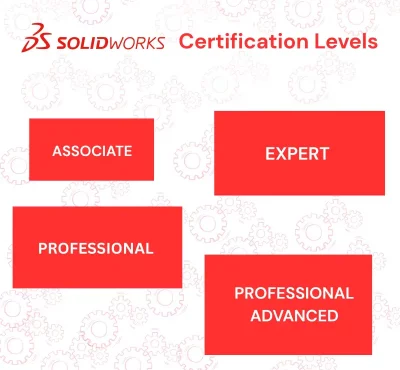
Dassault Systemes offers a broad range of certifications, all aimed at different levels of experience and specializations. A brief rundown:
1. CSWA – SOLIDWORKS Certified Associate
The CSWA is an entry-level credential for students and recent graduates. It will test your skills in basic modelling methods, part creation, assemblies, and drawing fundamentals.
Most appropriate for: Students, recent graduates, and newbies.
Topics covered: Sketching, extrusions, assemblies, and dimensioning.
2. CSWP – Certified SOLIDWORKS Professional
Along with the CSWA, the Certified SOLIDWORKS Professional (CSWP) certification verifies your advanced-level proficiency in parametric modeling, advanced assemblies, and assessing design modifications.
Targeted at: Experienced midlevel designers and engineers with good modeling ability.
Topic covered: Equations, configurations, design tables, and interference detection.
3. CSWE – Certified SOLIDWORKS Expert
The CSWE is the most advanced certification for experienced users who have already passed various specialty exams. It verifies your ability to tackle almost any design challenge with the help of advanced tools in SOLIDWORKS.
Recommended for: CAD managers and power users.
Subject matter covered: Multibody design, surfacing, sophisticated mates, and in-context assembly design.
4. Specialty Certifications
These comprise certifications in some areas like:
• Sheet Metal
• Weldments
•Surfacing
• Mold Tools
• Simulation
• Drawing Tools
•Additive Manufacturing
Each of these tests is focused on one aspect of the SOLIDWORKS universe and has specialist expertise.
Read also ➡️ Is Mechanical Engineering a Good Career for the Future?
List of Top SOLIDWORKS Certification Training Provider
If you’re planning to get SOLIDWORKS certified in 2025, there are several platforms that offer quality training based on your preferred learning style and goals. Here’s a quick overview of some popular options:
- i GET IT by Tata Technologies
Developed by Tata Technologies, i GET IT offers over 775 hours of SOLIDWORKS learning content. It includes downloadable practice files, certification-focused assessments, and modules that cover sketching, assemblies, simulation, and more — ideal for learners looking for structured, industry-relevant training. - Coursera
Coursera hosts SOLIDWORKS courses offered by accredited universities. These typically focus on fundamentals and may include certifications from academic institutions. - Udemy
A popular choice for self-paced learners, Udemy offers a wide variety of affordable SOLIDWORKS courses taught by independent instructors. Content quality can vary, so it’s worth checking reviews and previews.
- LinkedIn Learning
This platform provides concise, professionally curated tutorials that are great for brushing up specific skills or learning on the go.
- YouTube & CAD Blogs
For learners who prefer informal or free resources, Design engineering focused YouTube channels and blogs offer a range of tutorials and practical walkthroughs — best suited for experienced or highly motivated self-learners.
There’s no one-size-fits-all approach to SOLIDWORKS training. Whether you’re just starting out or preparing for advanced certification, choosing a platform that aligns with your technical background and career goals is key. All of the above offer something unique — from structured certification prep to flexible, budget-friendly learning.
Who Should Get Certified?

- Engineering students wanting a competitive edge.
- Mechanical/product designers switching jobs.
- CAD professionals looking to upgrade skills.
- Companies wanting to upskill their workforce.
Preparing for the SOLIDWORKS Certification Exam
From my experience, preparing for the SOLIDWORKS certification isn’t just about memorizing commands — it’s about building the confidence to apply them efficiently, especially when time is limited.
All SOLIDWORKS certification exams are taken online through the Virtual Tester system.
- Time Frame: Most exams range from one to three hours.
- Format: A mix of hands-on modeling tasks, multiple-choice questions, and problem-solving exercises.
- Software Requirement: SOLIDWORKS must be installed on your computer to take the exam.
Exam costs depend on the type you choose and where you’re located. Some fees are covered through training packages or student memberships.
Once you successfully pass the exam, your certificate is available instantly and can be downloaded, printed, or shared digitally.
Advantages of Becoming a SOLIDWORKS Certified Professional
Getting SOLIDWORKS certified isn’t just about earning a badge — it’s a globally recognized proof of your design skills and real-world expertise.
- Official Directory Listing: Your name is added to the SOLIDWORKS Certification Directory, increasing your visibility to potential employers worldwide.
- Higher Job Priority: Certified candidates often receive preference during recruitment, especially for design roles.
- Stronger Professional Network: Gain access to the global SOLIDWORKS community, where professionals share knowledge, opportunities, and insights.
- Freelancing Credibility: A certification boosts your trustworthiness, making you more appealing to clients and increasing your earning potential.
- Leadership Opportunities: Certified professionals are often trusted with mentoring junior designers, leading teams, or conducting training sessions.
Companies across industries — including automotive, aerospace, electronics, and consumer product design — actively look for candidates with CSWA or CSWP certifications during hiring.
Salary Structure for SOLIDWORKS-Certified Professionals in India
|
Job Role
|
Salary Range (INR)
|
|---|---|
|
CAD Designer / SolidWorks Designer
|
Entry: ₹2.4–4.0 LPA Avg: ₹3 LPA
|
|
Mechanical Design Engineer / CAD Engineer
|
₹3–5.5 LPA (entry), ₹6–8.5 LPA (mid), ₹9–12 LPA (exp)
|
|
Product Design Engineer
|
₹3.5–6.5 LPA (entry), ₹7–10 LPA (mid), ₹10–15 LPA (exp)
|
|
Simulation / CAE Engineer
|
₹4–7 LPA (entry), ₹8–12 LPA (mid) ₹12–18 LPA(exp)
|
|
Tooling / Mold Design Engineer
|
₹3–6 LPA (entry), ₹6.5–9 LPA (mid) ₹9–13 LPA (exp)
|
|
PLM / PDM Specialist
|
₹3–6 LPA (entry), ₹6.5–9 LPA (mid), ₹9–13 LPA (exp)
|
|
Trainer / Instructor (SOLIDWORKS)
|
₹3–6 LPA (entry) ₹6.5–9 LPA (mid) ₹9–13 LPA(exp)
|
Source: Salary data referenced above is based on insights from AmbitionBox (2025), reflecting average industry trends for SOLIDWORKS-certified professionals in India. Actual figures may vary depending on experience, company, and location.
Special Bonus Tips for Our SOLIDWORKS Enthusiasts & Learners

To help you prepare better for your SOLIDWORKS certification, we’ve curated a hands-on video playlist covering essential tools and techniques. From Sheet Metal Updates in SOLIDWORKS 2024 to 3D Sketching, Feature Works, and advanced tips like Linking Annotations to Models, our videos are quick, to the point, and crafted by industry professionals. Whether you’re brushing up for an exam or learning something new, these videos are a must-watch!
Final Thoughts: Your Next Step Starts Here
If you’re serious about building a strong career in mechanical design or product engineering, investing in SOLIDWORKS certification training is a powerful step forward. Whether you’re starting with the CSWA (Certified SOLIDWORKS Associate) or aiming higher with advanced credentials like CSWP or CSWE, each certification adds weight to your profile. These globally recognized credentials not only validate your design skills but also set you apart in a competitive job market.
At i GET IT by Tata Technologies, we believe certifications aren’t just badges — they’re proof of your practical knowledge, problem-solving ability, and readiness to take on real-world engineering challenges.
So why wait? Take your next step toward becoming a certified SOLIDWORKS professional today.
FAQs on SOLIDWORKS Certification
Yes, it is highly respected in mechanical design, product development, and CAD-based roles. It helps you get hired faster and can boost your salary.
SOLIDWORKS is used for 3D product design and modeling in industries like automotive, electronics, and aerospace. It helps engineers turn concepts into manufacturable designs.
Start with CSWA (Certified SOLIDWORKS Associate).It’s beginner-friendly and well-suited for college students, fresh graduates, or anyone starting their journey in 3D CAD design.
Yes, you can find free tutorials on YouTube and official SOLIDWORKS channels, but for certification-level prep, structured platforms like i GET IT are recommended.
Entry-level salary ranges from ₹2.4–6 LPA, and experienced professionals can go up to ₹13 LPA depending on job role and location.
CSWA usually takes 1–2 months with consistent practice. CSWP or CSWE can take 2–4 months or longer, depending on your pace.
All SOLIDWORKS exams are taken online using the Virtual Tester platform. You’ll need the software installed and a steady internet connection.
Not at all! Even diploma holders, designers, and technical enthusiasts can learn it. No engineering degree is required to start.
You can train with i GET IT by Tata Technologies, MySolidWorks, certified resellers, or explore structured online courses.
Yes, certifications boost your credibility and make you stand out to recruiters or clients. You’re also listed in the official SOLIDWORKS Certification Directory.

Manjunath
Related Posts

Top Automotive Design Engineer Courses by Tata Technologies

PLM Teamcenter Interview Questions and Answers – [HR Expert List]

Hybrid Electric Vehicles Webinar With Kedar Gokhale

Best EV Online Courses with Certification by Tata Technologies

Most Common GD&T Interview Questions & Answers [Expert’s List]
Find
Categories
Popular Tags